This series of blog posts aims to answer the question, can we significantly escalate our privileges via the source code provider permissions granted to AWS if we can compromise a single AWS account or single AWS service such as CodePipeline. You can view all the posts in this series by visiting my AWS CodeConnection project page.
What are AWS CodeConnections?
AWS CodeConnections (formally called CodeStar Connections) is a feature in AWS which allows AWS resources such as AWS CodePipeline to connect to external code repositories. This is often useful for services in AWS which help you build, test and deploy your code and avoids the need for you to store secrets that grant access to your source code repository.
See AWS’s CodeConnection documentation for further details on the service.
One important point worth drawing attention to in the documentation is that AWS CodeConnections are global resources so regardless of the region it is deployed into, it can be accessed from all other regions.
What AWS Services use AWS CodeConnections?
When originally launched sometime back around 2020, CodeConnections (back then called CodeStar Connections) was only compatible with AWS CodePipeline.
Since then, AWS have enabled several other services to use CodeConnections. If you already have a CodeConnection installed in your AWS account then it will automatically become available for these new services. Therefore, with each new service added, the potential attack surface of exploiting your existing CodeConnections increases so it’s important that we look at how each service works and what risks it brings to your code repositories.
At the time of writing the complete list of supported services is:
- Amazon CodeGuru Reviewer
- Amazon Q Developer
- Amazon SageMaker
- AWS App Runner
- AWS CloudFormation
- Service Catalog
- AWS Proton
- CodeBuild
- CodePipeline
There may have been further services added since this was written so I recommend you checkout the CodeConnections documentation for the latest list.
What permissions does AWS CodeConnections get on your code repositories?
GitHub Cloud
To use AWS CodeConnections on GitHub Cloud you must have the “AWS Connector for Github” application installed. Typically you’ll install this on an organisation but it can also be installed on a user.
When you install an App in Github, you cannot control the permissions the app is granted. So the only control you have is which repositories you add to the allowlist that controls which repositories the app can access. In the majority of installations, I’d expect either “All Repositories” is used (i.e. no allowlist) or the majority of the org is in the allowlist due to the one app restriction mentioned below.
You can view the permissions you grant the application on the GitHub Marketplace. At the time of writing this included:
- Repository: Read access to actions, deployments, environments, issues, and metadata
- Repository: Read and write access to administration, code, commit statuses, pull requests, and repository hooks
- Organization: Read access to members
- Organization: Read and write access to organization hooks and organization self hosted runners
- User: Read access to public repositories, public organization information, and public user profile data
With these permissions you could:
- Read the repository, write to any branch you want and even delete the repository
- Remove any branch/ruleset protections that enforce Pull Requests.
- Remove any GitHub environment restrictions that require approval to deploy to AWS.
- Edit GitHub Action workflows or edit any other CI/CD build scripts.
- Add new administrators to the repository. Remove existing administrators.
- Read GitHub secrets or environment secrets
- Register rogue GitHub organisation action runners
When you create a GitHub CodeConnection within AWS, you have two options of granting permissions via the “AWS Connector for Github”:
- Select an “App installation” to connect as a bot. In this case you select the “AWS Connector for Github” installation on an org or user and the CodeConnection gets the full permissions detailed above on that particular org or user. The actions taken by the CodeConnection are logged in GitHub as the “AWS Connector for Github” app.
- Do not select an “App installation” to connect as a GitHub user. In this case, the CodeConnection uses the “Act on your behalf” permission of the “AWS Connector for Github” app. In other words, it acts on behalf of the GitHub user creating the CodeConnection and actions taken by the CodeConnection are logged in GitHub as that particular user. As outlined in the GitHub App documentation, the permissions CodeConnection gets is the intersection of the permissions of the user AND the permissions of any “AWS Connector for Github” installations on org repos they can access. So to be able to read from a repository in an org, the user needs to have read permissions on the repository AND the “AWS Connector for Github” app needs to be installed on that org with an allowlist allowing access to the repository.
The ability to connect as a GitHub user was only introduced sometime towards end of 2024 (according to changes in AWS CodeConnection documentation). Therefore, in the majority of cases, I’d expect the “App installation”/connect as a bot permissions to be being used and the blog posts will focus on the CodeConnection using the “App installation” scenario. In these cases, if we can access the permissions of the App directly via AWS CodeConnection we can do a significant amount of damage to all the repositories the app can access.
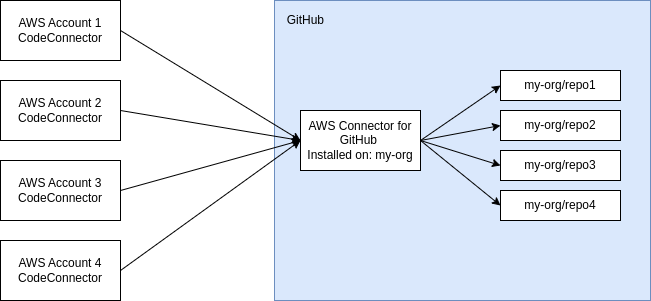
It is also worth noting that you can only install one instance of this application under a GitHub organisation and any CodeConnections that need access to repositories under this GitHub organisation will have to use this one instance of the app. Therefore, if you have several different AWS accounts that need to access several different repositories then the CodeConnections installed into all of the AWS accounts will have the same access to that set of repositories in the GitHub organisation as shown in the image below.
BitBucket Cloud
To use AWS CodeConnections on BitBucket Cloud you must have the “AWS CodeStar application” installed on your workspace.
I’ve not got as much experience with BitBucket but it is worth noting that unlike GitHub above, we don’t even have an allowlist of repositories we can control when installing. So you get to choose whether you install it on a BitBucket workspace or not and that is all the control you get.
At the time of writing, when you install it requests the following permissions on all your repositories in a workspace:
- Read you account information
- Read and modify your repositories and their pull requests
- Administer your repositories
- Read and modify your repositories’ webhooks
Again, we see administrator permissions and read/write to code so likely these permissions could be used to maliciously take ownership of the repository bypassing any protections to writing code.
GitLab Cloud
To use AWS CodeConnections on GitLab Cloud you must have the “AWS Connector for GitLab” application installed on your account.
Again I don’t have much experience with GitLab but it also doesn’t have an allowlist of repositories feature we can control when installing. So again, you get to choose to install it or not and that is all the control you get.
At the time of writing, when you install it requests the following permissions on all your repositories:
- Access the API on your behalf
- Read your personal information
- Read API
- Allows read-only access to the repository
- Allows read-write access to the repository
- Grants create access to the runners
- Grants access to manage the runners
These permissions look a little better as I’m not seeing administrator permissions but it does still have access to manage runners so may be able to be leveraged to tamper with build jobs.
Other Connection Types
CodeConnections also supports these other connection types:
- GitHub Enterprise Server
- GitLab self-managed
- Azure DevOps
I’ve not explored self-hosting GitHub or GitLab and have not experimented with Azure DevOps so this series of blog posts will focus on GitHub, BitBucket and GitLab Cloud CodeConnections.
How is a CodeConnection in an AWS Account installed?
You can find details on installing a CodeConnection in the AWS Developer Tool Console documentation.
In general, you install the CodeConnection by going through an OAuth flow with the source code provider. This flow will have to be done by a user with sufficient permissions on the source code repository provider (usually an organisation/workspace owner). Once this flow is completed the CodeConnection becomes authenticated and connected to the source code repository provider. You don’t need to go through this flow again. The connection will continue working until it is removed from the AWS account or the AWS app is removed from the source code provider.
One thing to note is that when installing a CodeConnection in an AWS account you don’t get any further controls to scope down it’s access within that particular AWS account. So once installed it will have the same permissions as the AWS app (in the source code provider) it is connected to.
The only controls you have in AWS are the IAM roles and condition keys you can use with services such as CodeBuild to restrict the permissions and repositories that can be accessed. However, if you have a user that can create IAM roles (e.g. an administrator) then they will be able to leverage the full permissions of that authenticated CodeConnection by creating a role without any restrictions.
Do note, that AWS Resource Access Manager (RAM) can be used to have a central CodeConnection that is shared to multiple AWS accounts. This doesn’t change the permissions each AWS account gets on the source code provider but it does provide a more centralised way to keep track of CodeConnections and manage them in an incident situation.
What IAM permissions are used with CodeConnections?
You can find the IAM permissions that are used with CodeConnections in the AWS Service Authorisation Reference documentation. We’ll cover several of these permissions in significantly more detail as we explore each service in turn.
You’ll also find that the mapping between action on source code provider and AWS IAM permission is not 1:1. For example, the codeconnections:UseConnection permission has several actions that can be performed using this permission such as ListBranches, ListRepositories, etc.
You can see the find some further information around CodeConnection actions in the AWS Developer Tools Console documentation.
You’ll also find in these documentations details around condition keys you can use on IAM policies to help reduce down the level of access to CodeConnection. It is recommended to use these where possible.
Installation of CodeConnection example
You want to use CodeConnections in your AWS Account with 5 GitHub repositories that you own within your organisation. You ask your GitHub organisation owner to help you.
The GitHub organisation owner installs the “AWS Connector For GitHub” app on the organisation and grants it access to your 5 repositories within the GitHub organisation.
They then help you to install the CodeConnection in your AWS account by performing the OAuth authorisation flow and setting up the CodeConnection to act as a bot via the organisation install of the “AWS Connector For GitHub” app. During this flow, the GitHub organisation owner cannot restrict permissions further when installing so that CodeConnection in your AWS account will end up with access to all repositories the “AWS Connector For GitHub” app has access to.
You as an AWS administrator can restrict IAM policies/roles with condition keys to only allow access to one repository from your CodePipeline roles which are used during your build pipeline. However, as a high privilege user in the AWS account can access the full 5 repositories if you wanted as you can create an unrestricted IAM role and use that.
A little while later, another team wants to use CodeConnections to connect to the same Github organisation in their AWS account.
The GitHub organisation owner grants the “AWS Connector For GitHub” access to 5 more repositories owned by this team and authorises the CodeConnection in their AWS account. This team now has access to 10 repositories in their AWS account and your AWS account’s CodeConnection can now also access the 10 repositories too.
As you can see, the more teams/AWS accounts that get onboarded to use CodeConnections the more risk your GitHub organisation is exposed to and the more reliant you are on each and every AWS account (and users with access) being secure. You could force each team to use their own GitHub organisation and this wouldn’t be an issue as each organisation can have separate AWS apps and hence separate permissions on CodeConnection but this approach comes with a lot of overhead in other areas.
In BitBucket and GitLab, there isn’t an option for a repository allowlist so the app gets full repository access and hence each AWS account the CodeConnection is added to gets full access to the BitBucket workspace/GitLab project.
Summary
Hopefully this post has given you a good idea how CodeConnections works at a high level and the permissions it has on various source code providers such as GitHub. If you are a large organisation with 1000s of source code repositories and 100s of AWS accounts then hopefully you are now wondering what damage could be done if just one AWS account or one AWS service using CodeConnection is compromised.
In the next few posts we’ll be looking at ways of exploiting these permissions granted to CodeConnections to get privilege escalation across code repositories and AWS accounts. Below is a diagram showing the potential set of attack scenarios that we are looking to build via different AWS services.
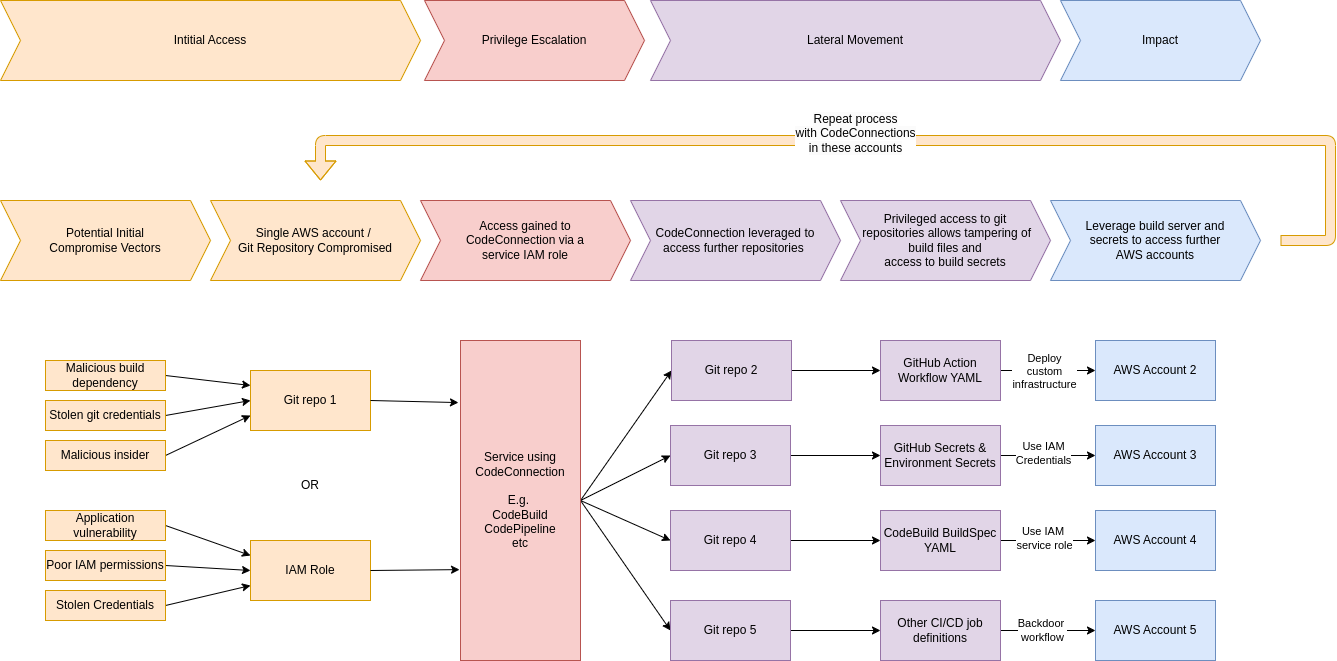
In the next post, we’ll focus our attention on how CodePipeline leverages CodeConnections and dive further into the UseConnection permission to see what damage an attacker can do.
See the AWS CodeConnection project page for links to further posts.